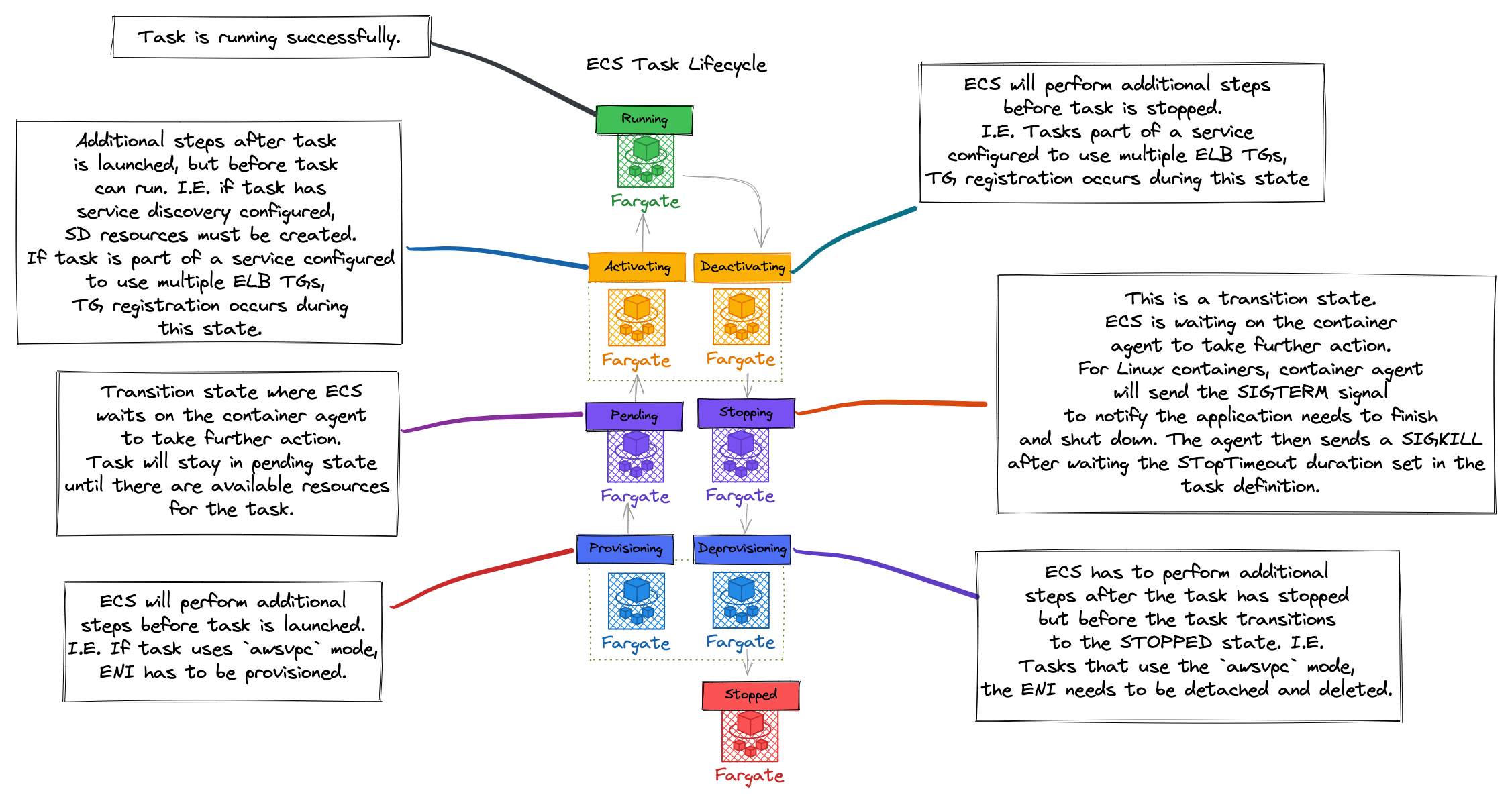
Blog Post
Getting Started with Amazon ECS and Bottlerocket
Bottlerocket is a Linux-based operating system optimized for hosting containers. It’s free and open-source software, developed in the open on GitHub. Bottlerocket is installed as the base operating system on the machine or instance where your containers themselves are running. It is specifically designed to work with your container orchestrator (like Amazon ECS on EC2) to automate the lifecycle of the containers running in your cluster. Learn more in the video below:
Getting Started with Amazon ECS and Bottlerocket

Blog Post
Getting Started with Amazon ECS and Amazon ECR
Amazon ECR eliminates the need to operate your own container repositories or worry about scaling the underlying infrastructure. Amazon ECR hosts your images in a highly available and scalable architecture, allowing you to reliably deploy containers for your applications. Learn more in the video below:
Getting Started with Amazon ECS and Amazon ECR
Blog Post
Getting Started with Amazon ECS and CI/CD
Learn how to setup your first CI/CD pipeline using Amazon ECS, Amazon ECR, and AWS Developer Tools. CI/CD automates the application lifecycle, giving developers velocity and control over their containerized apps and services. This video walks through how to build the underlying infrastructure for running containers, creating a build pipeline using AWS Cloudformation, using GitHub Actions to push a container image to Amazon ECR, and deploying the image into a container running on Amazon ECS. Learn more in the video below:
Getting Started with Amazon ECS and CI/CD
Blog Post
Getting Started with Amazon ECS and Amazon CloudWatch
Amazon ECS makes it easy to run and scale containerized workloads on AWS. Amazon CloudWatch lets you monitor running containers, the CPU and memory utilization of your containerized services, and setup alarms that automatically scale your services based on utilization. Learn more in the following video:
Getting Started with Amazon ECS and Amazon CloudWatch
Blog Post
Getting Started with Amazon ECS and Load Balancers
Once you’re running containerized services on Amazon ECS, how do you get traffic to your containers to evenly distribute load and prevent dropped requests? Learn about how to setup Amazon ECS task definitions, configuring Target Groups, using the Application Load Balancer, and safely stopping services using task draining to make routing decisions and enable safe deployments for your containerized services in the following video:
Getting Started with Amazon ECS and Load Balancers
Blog Post
Getting Started with ECS and Autoscaling
Amazon Elastic Container Service (ECS) is a highly scalable, high performance container management service that supports industry-standard containers and allows you to easily run applications on a managed cluster of Amazon EC2 instances. Learn about the integrated Autoscaling feature in Amazon ECS that allow containerized services to handle variable load over time and react in real-time to changing and inconsistent demand conditions in the following video:
Getting Started with Amazon ECS and Autoscaling
Blog Post
Getting Started with Amazon ECS and Task Placement
Amazon Elastic Container Service (Amazon ECS) makes it easy to run and scale containerized workloads on AWS. The Amazon ECS task placement engine determines where tasks (logical groups of running containers) run. This lets you configure your containerized workloads for high-availability, resource optimization, or a combination of both. Learn more in the video below:
Getting started with Amazon ECS and Task Placement
Blog Post
Getting Started with Amazon ECS and Core Concepts
Want to learn about Amazon ECS and Amazon Elastic Container Registry (Amazon ECR) and how they can help you to deploy, manage, and scale industry-standard containerized applications on AWS? Checkout this Getting Started with Amazon ECS and Core Concepts video below:
Getting Started with Amazon ECS and Core Concepts
Blog Post
Cleaning up orphaned Amazon ECS container instances
I would like to share an interesting problem that came from some of our customers. This was an issue that they encountered with some of the EC2 instances in their ECS cluster. This blog post will suggest two solutions to solving this issue.
A solution for dealing with orphaned EC2 nodes in your ECS cluster

Blog Post
Sparking joy in container host maintenance
I’m sure you can relate to this story:
Step 1: You build the perfect application,
…
Step 3: you never think about it again.
In the end, your team hands you a trophy and you get a massive raise for your efforts as well as the love/adoration of junior, senior, and executive colleagues. Happens every day.
A look at maintaining the host OS for container nodes

Blog Post
The TL;DR of security with Amazon ECS
Imagine you sit down with your boss and they ask you “What do you think about Amazon Elastic Container Service (Amazon ECS) and security?” It’s a big topic, but worth exploring. In this blog post, you’ll learn about aspects of Amazon ECS that support better security practices and give you a few talking points when your boss asks you a similar question.
A high-level overview of Amazon ECS security
Blog Post
Using TLS certificates with Amazon ECS Service Connect
With this release, Amazon ECS integrates with AWS Private CA and automates the process of issuing, distributing, and rotating certificates, making it simple for customers to secure traffic between services without adding extra operational workload. Now Amazon ECS Service Connect customers can encrypt service-to-service communication using TLS without modifying their application code, as well as without requiring any extra network infrastructure or operating service mesh solutions. You can enable traffic encryption when at a per-Service Connect enabled service level within an existing namespace. First, you choose an existing or create a new AWS Private Certificate Authority, and then select it in the AWS Console, or provide its Amazon Resource Name (ARN) via CLI, to be used with your Amazon ECS Service Connect namespace. This CA is used for signing your certificates and will also be used as the root of trust. By default, Amazon ECS uses AWS managed symmetric encryption key to store the private key into customer’s secret manager. Optionally, you can provide your own symmetric keys for compliance reasons.
A post showing how to enable TLS on ECS services using Service Connect

Blog Post
Why use containers for your application?
Containers are a popular open source standard for developing, packaging, and operating applications at scale. There are a few key benefits to using containers:
Packaging
Containers provide you with a reliable way to gather your application components and package them together into one build artifact. This is important because modern applications are usually composed of a variety of pieces that must work together in sync. These pieces include not only your code, but also dependencies, binaries, or system libraries.
What are the benefits of packaging your application as a container?

Blog Post
Why use infrastructure as code?
Infrastructure as code is the process of provisioning and managing your cloud resources by writing a template file that describes what infrastructure you want to create. The template file is both human readable, as well as machine consumable. Humans write or edit the file in order to change what infrastructure they would like in their cloud deployment. An infrastructure as code service then makes automated API calls to actually create or update the infrastructure to match what the infrastructure as code template requested.
Infrastructure as code can help you deploy cloud architecture faster and more reliably.
Blog Post
Hello World
Well, well, well. Look what we have here.
You have no idea how pleased I am to present to the world the newest resources for AWS Builders using Amazon Elastic Container services. We talk a lot about the mind-numbing size and popularity of ECS, including:
Welcome to Containers on AWS, the newest resource for AWS builders who want to deploy containerized applications on Amazon ECS
Blog Post
Hi I'm Nathan Peck! 👋
Hi! I work as a senior developer advocate at AWS.
Prior to working at AWS I worked in the NYC startup scene, on my own personal projects, as well as Airtime (a social media platform focused on live social experiences), and StoryDesk (an iPad first presentation software with a built-in analytics system).
Meet AWS developer advocate Nathan Peck, and learn his thoughts on building with containers.
Blog Post
Shalom, I'm Maish!!
Hello everyone, it is a pleasure to meet you all. Let me introduce myself.
My name is Maish Saidel-Keesing and I am a Senior Developer Advocate for the Amazon Elastic Container Service team at AWS. I have been tinkering with technology for a LONG time, I can still remember when my first computer was a ZX Spectrum, where I mostly played computer games as a kid that would load from a tape recorder. We have come a long way since then.
Meet Maish Saidel-Keesing, developer advocate at AWS
Blog Post
Hello friends, I'm Jessica!
Hi friends! My name is Jessica Deen and I’m currently a Principal Developer Advocate at AWS focusing on Amazon Elastic Container Service (Amazon ECS). Prior to joining AWS, I worked for Microsoft in a variety of capacitities for over a decade. Before that, I spent over a decade as an IT Consultant / Systems Administrator for various corporate and enterprise environments, catering to end users and IT professionals in the San Francisco Bay Area. I hold three Microsoft Certifications (MCP, MSTS, Azure Infrastructure), 3 (now expired) CompTIA certifications (A+, Network+, and Security+), 4 (probably expired and irrelevant) Apple Certifications, and I’m a former 4-year Microsoft MVP (Most Valuable Professional) for Windows and Devices for IT. In 2013, I achieved my FEMA Professional Development Series (PDS) certification from the U.S Department of Homeland Security, which recognized my communication, leadership, influence, problem solving, and decision making abilities during times of crisis and emergency.
Meet Jessica Deen, developer advocate at AWS
Blog Post
EC2 or AWS Fargate?
There are two main compute options for running containers with Amazon Elastic Container Service:
- EC2 (Deploy and manage your own cluster of self managed virtual machine instances that can each run one or more containers)
- AWS Fargate (Run containers directly, without any virtual machines to think about)
Both are completely valid techniques for operating your containers in a scalable and reliable fashion. Which one you pick depends on which factors you want to optimize for.
Comparison of Amazon EC2 and AWS Fargate across pricing, performance, and administrative overhead, with examples of best fits for each compute option.
Blog Post
Why should I use an orchestrator like Amazon ECS or Kubernetes?
If you work in software development for the cloud you have probably heard of infrastructure orchestrators such as Kubernetes, Amazon Elastic Container Service, or Hashicorp Nomad.
Does container orchestration make it easier to manage your application, or does it make it harder?
Blog Post
Automate java performance troubleshooting with AI-Powered thread dump analysis on Amazon ECS and EKS
Picture this your containerized Java application that was running smoothly yesterday is now consuming 90% CPU and barely responding to user requests. Now your customers are experiencing timeouts, and your ops team is under pressure to resolve the issue quickly. When debugging unresponsive applications or excessive CPU consumption, one of the most valuable diagnostic tools […]
Read more...

Blog Post
Troubleshooting containerized workloads with Amazon ECS Events in the AWS console
In this post, we show how you can use the new event capture capability in the Amazon ECS console to automatically collect and analyze operational events without manually configuring EventBridge rules or CloudWatch log groups. We demonstrate how to enable Amazon ECS event capture with a single click and use the integrated query interface to investigate operational scenarios such as task failures, deployments, and resource constraints issues .
Read more...
Blog Post
Accelerate container troubleshooting with the fully managed Amazon ECS MCP server (preview)
Amazon ECS today launched a fully managed, remote Model Context Protocol (MCP) server in preview, enabling AI agents to provide deep contextual knowledge of ECS workflows, APIs, and best practices for more accurate guidance throughout your application lifecycle. In this post, we walk through how to streamline your container troubleshooting using the Amazon ECS MCP server, which offers intelligent AI-assisted inspection and diagnostics through natural language queries in CLI tools like Kiro, IDEs like Cline and Cursor, and directly within the Amazon ECS console through Amazon Q.
Read more...
Blog Post
Amazon ECS at AWS re:Invent 2025
Amazon Web Services (AWS) re:Invent returns to Las Vegas from December 1-5, 2025, bringing together the global cloud computing community for an unparalleled learning experience. This premier event is where cloud pioneers gather from across the globe for the latest AWS innovations, peer-to-peer learning, expert-led discussions, and invaluable networking opportunities. The Amazon Elastic Container Service […]
Read more...
Blog Post
Deep Dive: Amazon ECS Managed Instances provisioning and optimization
Amazon Elastic Container Service (Amazon ECS) Managed Instances is a fully managed compute option that eliminates infrastructure management overhead while providing customers access to a broad suite of Amazon Elastic Compute Cloud (Amazon EC2) capabilities, including the flexibility to select instance types, access reserved capacity, and leverage advanced security and observability configurations. By offloading operations […]
Read more...
Blog Post
Troubleshooting with Amazon ECS Exec and Amazon CloudWatch Logs Live Tail in the AWS Management Console
In this post, we explore how the integration of Amazon CloudWatch Logs Live Tail and Amazon ECS Exec with AWS CloudShell in the Amazon ECS console streamlines container troubleshooting by eliminating the need to switch between multiple interfaces or maintain separate CLI configurations. These new features centralize essential debugging capabilities, allowing DevOps engineers and developers to maintain reliable container-based applications while preserving necessary security and governance controls.
Read more...
Blog Post
Migrate Amazon ECS workloads from AWS App Mesh to Amazon VPC Lattice
In this post, we guide you through the process of migrating from AWS App Mesh to Amazon VPC Lattice, highlighting key considerations and benefits that this transition offers for your cloud infrastructure. We demonstrate how to migrate an IT Inventory Management System application from AWS App Mesh to VPC Lattice using Amazon ECS, with detailed steps for creating VPC Lattice resources, updating task definitions, and implementing blue/green deployment strategies.
Read more...
Blog Post
Amazon ECS announces IPv6-only support
In this post, Amazon ECS announces support for IPv6-only workloads, allowing users to run containerized applications in IPv6-only environments without IPv4 dependencies while maintaining compatibility with existing applications and AWS services. The new capability helps organizations address IPv4 address exhaustion challenges, streamline network architecture, improve security posture, and meet compliance requirements for IPv6 adoption.
Read more...
Blog Post
Migrating from AWS CodeDeploy to Amazon ECS for blue/green deployments
In this post, we explore the migration path from AWS CodeDeploy to Amazon ECS for blue/green deployments, discussing key architectural differences and implementation considerations. We examine three different migration approaches - in-place update, new service with existing load balancer, and new service with new load balancer - along with their respective trade-offs in terms of complexity, risk, downtime, and cost.
Read more...
Blog Post
Extending deployment pipelines with Amazon ECS blue green deployments and lifecycle hooks
In this post, we explore how Amazon ECS's native support for blue/green deployments can be extended using lifecycle hooks to integrate test suites, manual approvals, and metrics into deployment pipelines.
Read more...
Blog Post
Optimize compute resources on Amazon ECS with Predictive Scaling
This blog is co-authored by Jooyoung Kim, Senior Containers Specialist Solutions Architect, Abhishek Nautiyal, Senior Product Manager, Amazon ECS and Ankur Sethi, Senior Product Manager, Amazon EC2. Introduction Amazon Elastic Container Service (Amazon ECS) is an opinionated, easy-to-use container orchestration service with deep AWS integrations that streamlines the deployment and management of containerized applications at […]
Read more...
Blog Post
Improving deployment visibility for Amazon ECS services
When deploying software, it’s critical to have visibility into all stages of the deployment process. Knowing the status of ongoing deployments, troubleshooting issues when things go wrong, and having an audit trail of past deployments are essential for ensuring a safe and reliable release process. Amazon Elastic Container Service (Amazon ECS) now provides enhanced observability […]
Read more...
Blog Post
How Infinitium reduced fraud detection time by 95% with Amazon ECS and AWS Fargate on AWS Graviton
This post was created in collaboration with Infinitium Engineering Team. Introduction Infinitium (a Euronet Company) is a leading digital payments company in Southeast Asia, specializing in secure online payment solutions and risk management services. With a strong presence across the Asia Pacific region, Infinitium offers cutting-edge technologies such as 3D Secure (3DS) authentication, fraud detection […]
Read more...
Blog Post
Serverless containers at AWS re:Invent 2024
AWS re:Invent is the premier learning conference hosted by AWS for the global cloud computing community. This year the Amazon Elastic Container Service (Amazon ECS) and AWS Fargate teams will share the latest trends, innovations, best practices, and tips to help you increase productivity, optimize costs, and enhance business agility. Join us in Las Vegas […]
Read more...
Blog Post
Migrating from AWS App Mesh to Amazon ECS Service Connect
After careful consideration, we have made the decision to discontinue AWS App Mesh, effective September 30th, 2026. Until this date, existing AWS App Mesh customers will be able to use the service as normal, including creating new resources and onboarding new accounts via the AWS CLI and AWS CloudFormation. Additionally, AWS will continue to provide […]
Read more...
Blog Post
Unlocking AWS Fargate feature for attaching Amazon EBS Volumes to ECS Tasks
Introduction Amazon Elastic Container Service (Amazon ECS) has now enhanced its functionalities by integrating support for Amazon Elastic Block Store (Amazon EBS) volume attachment to Amazon ECS tasks. This feature simplifies using Amazon ECS and AWS Fargate with Amazon EBS. Amazon ECS facilitates seamless provisioning and attachment of EBS volumes to ECS tasks on both […]
Read more...
Blog Post
Scale your Amazon ECS using different AWS native services!
Containers accelerate application development and enhance deployment consistency across environments, thus enabling organizations to improve productivity and agility. AWS container services such as Amazon Elastic Container Service (Amazon ECS) make it easier to manage your application so you can focus on innovation and your business needs. Customer experience is the most important yardstick by which […]
Read more...
Blog Post
Windows authentication with gMSA on Linux containers on Amazon ECS with AWS Fargate
Introduction Today, we are announcing the availability of Credentials Fetcher integration with AWS Fargate on Amazon Elastic Container Service (Amazon ECS). With this launch, you have the option of running Linux containers on Amazon ECS using both the Amazon Elastic Compute Cloud (Amazon EC2) launch type, as well as with AWS Fargate serverless compute launch […]
Read more...
Blog Post
Distributed machine learning with Amazon ECS
Running distributed machine learning (ML) workloads on Amazon Elastic Container Service (Amazon ECS) allows ML teams to focus on creating, training and deploying models, rather than spending time managing the container orchestration engine. With a simple architecture, control plane transparent upgrades, and native AWS Identity and Access Management (IAM) authentication, Amazon ECS provides a great environment […]
Read more...
Blog Post
How Perry Street Software Implemented Resilient Deployment Strategies with Amazon ECS
This post was coauthored by Ben Duffield and Eric Silverberg at Perry Street Software, with contributions from Adam Tucker, Piotr Wald, and Cristian Constantinescu of PSS. You just finished deploying that important change you spent weeks preparing, when you see this email subject in your inbox...
Read more...
Blog Post
Build preview environments for Amazon ECS applications with AWS Copilot
Introduction In the software development sphere, immediate evaluation of every code adjustment and deploying pull requests to active environments for immediate preview and feedback is essential. This practice is instrumental in reducing post-deployment issues and operational disruptions, underscoring the urgency for dedicated preview environments. Without these environments, the risk of merging unassessed features into the […]
Read more...
Blog Post
Secure Amazon Elastic Container Service workloads with Amazon ECS Service Connect
Introduction With this release, Amazon Elastic Container Service (Amazon ECS) integrates with AWS Private Certificate Authority (CA) and automates the process of issuing, distributing, and rotating certificates, which makes it simple for customers to secure traffic between services without adding extra operational workload. Now Amazon ECS Service Connect customers can encrypt service-to-service communication using Transport […]
Read more...
Blog Post
Amazon ECS enables easier EC2 capacity management, with managed instance draining
Amazon Elastic Container Service (ECS) deploys and manages your containerized tasks on AWS infrastructure. Customers can avoid the need to maintain compute instances by using Amazon ECS to deploy tasks on serverless AWS Fargate capacity. But some customers prefer to use Amazon ECS with Amazon Elastic Compute Cloud (Amazon EC2) as capacity. Using Amazon EC2 […]
Read more...
Blog Post
Effective use: Amazon ECS lifecycle events with Amazon CloudWatch logs insights
Introduction We have observed a growing adoption of container services among both startups and established companies. This trend is driven by the ease of deploying applications and migrating from on-premises environments to the cloud. One platform of choice for many of our customers is Amazon Elastic Container Service (Amazon ECS). The powerful simplicity of Amazon […]
Read more...
Blog Post
Run Monte Carlo simulations at scale with AWS Step Functions and AWS Fargate
Introduction Organizations across financial services and other industries have business processes that require executing the same business logic across billions of records for their machine learning and compliance needs. Many organizations rely on internal custom orchestration systems or big data frameworks to coordinate the parallel processing of their business logic across many parallel compute nodes. […]
Read more...
Blog Post
A deep dive into resilience and availability on Amazon Elastic Container Service
Introduction In this post, we’ll deep dive into the architecture principles we use in Amazon Elastic Container Service (Amazon ECS). We’ll outline some of the features that Amazon ECS delivers to make it easy for your application to achieve high availability and resilience. We explore how Amazon ECS is designed to use AWS availability and […]
Read more...
Blog Post
Use SMB storage with Windows containers on AWS Fargate
Introduction Customers can run their Windows container-based applications on Amazon Elastic Container Service (Amazon ECS) using AWS Fargate to avoid the undifferentiated heavy lifting of managing servers. A common use case for Windows Containers on AWS is to run web applications hosted using Internet Information Services (IIS). When using common files in a web farm, […]
Read more...
Blog Post
How Smartsheet optimized cost and performance with AWS Graviton and AWS Fargate
The post was co-written by Skylar Graika (Sr Principal Engineer, Smartsheet) Introduction Highly successful companies know that maintaining an accelerated pace of innovation is key to continued growth. They are increasingly looking to modernize their digital backbone of applications and development practices to support faster innovation and improved performance, security, and reliability, while maintaining a […]
Read more...
Blog Post
Build Generative AI apps on Amazon ECS for SageMaker JumpStart
Introduction The rise in popularity of Generative AI (GenAI) reflects a broader shift toward intelligent automation in the business landscape, which enables enterprises to innovate at an unprecedented scale, while adhering to dynamic market demands. While the promise of GenAI is exciting, the initial steps toward its adoption can be overwhelming. This post aims to […]
Read more...
Blog Post
Run Amazon EKS on RHEL Worker Nodes with IPVS Networking
Introduction Amazon Elastic Kubernetes Services (Amazon EKS) provides excellent abstraction from managing the Kubernetes control plane and data plane nodes that are responsible for operating and managing a cluster. AWS offers managed Amazon Machine Images, or AMIs, for Amazon Linux 2, Bottlerocket, and Windows Server. Many customers have requirements, or simply prefer, to use Red […]
Read more...
Blog Post
Migration considerations – Cloud Foundry to Amazon ECS with AWS Fargate
Introduction Customers often turn to Amazon Web Services (AWS) to scale their applications, reduce latency, and deploy new features quickly with pay as you go approach. Let’s take the case of customers running hundreds of applications using Cloud Foundry Platform as a Service (PaaS). To achieve cost efficiency, customers can migrate to AWS container services, […]
Read more...
Blog Post
Serverless containers at AWS re:Invent 2023
AWS re:Invent is the learning conference hosted by AWS for the global cloud computing community. This year the Amazon Elastic Container Service (Amazon ECS) and the AWS Fargate teams share their best practices and tips to help you increase productivity, optimize your costs, and amplify business agility. Join us in Las Vegas from November 27 […]
Read more...
Blog Post
Securing API endpoints using Amazon API Gateway and Amazon VPC Lattice
Introduction In microservices architectures, teams often build and manage internal applications that they expose as private API endpoints and publicly expose those endpoints through a centralized API gateway where security protections are centrally managed. These API endpoints allow both internal and external users to leverage the functionality of those applications. The separation of concerns between […]
Read more...
Blog Post
Run time sensitive workloads on ECS Fargate with clock accuracy tracking
Introduction In part 1 and part 2 of this series, the importance of measuring time accuracy and relevant concepts were discussed. Additionally, we covered specifics on ways to put those concepts into practice, track metrics using Amazon CloudWatch and implement a practical solution for Amazon Elastic Compute Cloud (Amazon EC2) instances. In this part 3, […]
Read more...
Blog Post
Scale to 15,000+ tasks in a single Amazon Elastic Container Service (ECS) cluster
Introduction Amazon Elastic Container Service (Amazon ECS) is a fully managed container orchestration service that simplifies your deployment, management, and scaling of containerized applications. Amazon ECS has deep AWS integrations and best practices built-in, which enable you to run and scale your applications in the cloud or on-premises, without the complexity of managing a control […]
Read more...
Blog Post
PBS speeds deployment and reduces costs with AWS Fargate
This blog post was co-authored by Mike Norton – VP Cloud Services & Operations, PBS, Warrick St. Jean – Sr. Director Solution Architect, PBS, and Brian Link – Director, Technical Operations, PBS Introduction PBS is a private, nonprofit corporation, founded in 1969, whose members are America’s public TV stations. They have been an AWS customer […]
Read more...
Blog Post
Start Spring Boot applications faster on AWS Fargate using SOCI
About a year ago, we published a post on how to Optimize your Spring Boot application for AWS Fargate, where we went into different optimization techniques to speed up the startup time of Spring Boot applications for AWS Fargate. We started the post with “Fast startup times are key to quickly react to disruptions and […]
Read more...
Blog Post
Build secure application networks with VPC Lattice, Amazon ECS, and AWS Lambda
Introduction In this post, we’ll explore how to publish and consume services running on Amazon Elastic Container Service (Amazon ECS) and AWS Lambda, as Amazon VPC Lattice services. For an introduction to Amazon VPC Lattice, please read the documentation here. One main reason customer experience a lower velocity of innovation, is the complexity they deal […]
Read more...
Blog Post
Improving operational visibility with AWS Fargate task retirement notifications
Introduction AWS Fargate, the serverless compute engine for containerized workloads, removes the undifferentiated heavy lifting of securing and patching the underlying infrastructure. In this blog post we dive into AWS Fargate task retirement, one of the ways AWS keeps the infrastructure secure and up to date. AWS has recently updated the AWS Fargate task retirement […]
Read more...
Blog Post
Multi-account infrastructure provisioning with AWS Control Tower and AWS Proton
Introduction The majority of the enterprise customers tend to establish centralize control and well-architected organization-wide policies when it comes to distribution of cloud resources in multiple teams. These teams are primarily divided into three categories - IT operations, Enterprise Security, and Application (App)-development. While delivery of business value from application standpoint falls under the purview of […]
Read more...
Blog Post
Announcing additional Linux controls for Amazon ECS tasks on AWS Fargate
Introduction An Amazon Elastic Container Service (Amazon ECS) task is a number of co-located containers that are scheduled on to AWS Fargate or an Amazon EC2 container instance. Containers use Linux namespaces to provide workload isolation—and with namespaces—even though containers are scheduled together in an Amazon ECS task, they’re still isolated from each other and […]
Read more...
Blog Post
Implement custom service discovery for Amazon ECS Anywhere tasks
Introduction Amazon Elastic Container Service (Amazon ECS) is a managed container orchestration service offered by AWS. It simplifies the deployment, management, and scalability of containerized applications using Amazon ECS task definitions through the AWS Management Console, AWS Command Line Interface (AWS CLI), or AWS Software Development Kits (AWS SDKs). Customers who require running containerized workloads, […]
Read more...
Blog Post
Preventing log loss with non-blocking mode in the AWSLogs container log driver
Introduction For improved observability and troubleshooting, it is recommended to ship container logs from the compute platform to a container running on to a centralized logging server. In the real world, the logging server may occasionally be unreachable or unable to accept logs. There is an architectural tradeoff when designing for log server failures. Service […]
Read more...
Blog Post
How RGC Genetics Center achieved infrastructure automation at scale using AWS Proton
This post was co-written with Rouel Lanche, Associate Director IT Architect, Regeneron Introduction Regeneron is a leading biotechnology company that invents, develops, and commercializes life-transforming medicines for people with serious diseases. Founded and led for 35 years by physician-scientists, Regeneron’s unique ability to repeatedly and consistently translate science into medicine has led to numerous FDA-approved […]
Read more...
Blog Post
Building better container images
Introduction Many applications built today or modernized from monoliths are done so using microservice architectures. The microservice architecture makes applications easier to scale and faster to develop, which enables innovation and accelerating time-to-market for new features. In addition, microservices also provide lifecycle autonomy enabling applications to have independent build and deploy processes, which provides technological […]
Read more...
Blog Post
Accelerate Amazon ECS-based workloads with ECS Blueprints
Introduction We are introducing ECS Blueprints for AWS Cloud Development Kit (AWS CDK) that makes it easier and faster to build container workloads for the Amazon Elastic Container Service (Amazon ECS). ECS Blueprints is a collection of Infrastructure as Code (IaC) open-source modules that help you configure and deploy container workloads on top of Amazon […]
Read more...
Blog Post
Implementing application load balancing of Amazon ECS Anywhere workloads using Traefik Proxy
Introduction With Amazon ECS Anywhere, you can run and manage containers on any customer-managed infrastructure using the same cloud-based, fully managed, and highly scalable container orchestration service you use in AWS today. Amazon ECS Anywhere provides support for registering an external instance, such as an on-premises server or virtual machine (VM), to your Amazon ECS […]
Read more...
Blog Post
Under the hood: Lazy Loading Container Images with Seekable OCI and AWS Fargate
AWS Fargate, a serverless compute engine for containerized workloads, now supports lazy loading container images that have been indexed using Seekable OCI (SOCI). Lazy loading container images with SOCI reduces the time taken to launch Amazon Elastic Container Service (Amazon ECS) Tasks on AWS Fargate. Donnie Prakoso’s launch post provides details on how to get […]
Read more...
Blog Post
Using Windows Authentication with gMSA on Linux Containers on Amazon ECS
On July 17th 2023, AWS launched support for Windows authentication with gMSA on non-domain-joined (domainless) Amazon ECS Linux container instances. This blog post has been updated to cover both modes, making domainless mode the default. Introduction Today, we are announcing the availability of Credentials Fetcher integration with Amazon Elastic Container Service (Amazon ECS). This […]
Read more...
Blog Post
Scaling IaC and CI/CD pipelines with Terraform, GitHub Actions, and AWS Proton
Introduction Modern applications run on a variety of compute platforms in AWS including serverless services such as AWS Lambda, AWS App Runner, and AWS Fargate. Organizations today are often required to support architectures using a variety of these AWS services, each offering unique runtime characteristics, such as concurrency and scaling, which can be purpose fit […]
Read more...
Blog Post
Announcing AWS Fault Injection Simulator new features for Amazon ECS workloads
Introduction We are happy to announce new features in AWS Fault Injection Simulator (FIS) that allow you to inject a variety faults into workloads running in Amazon Elastic Container Service (Amazon ECS) and Amazon Elastic Kubernetes Service (Amazon EKS). This blog shows how to use new AWS FIS actions with Amazon ECS. AWS Fault Injection […]
Read more...
Blog Post
Hosting Amazon Managed Workflows for Apache Airflow (MWAA) Local-runner on Amazon ECS Fargate for development and testing
Introduction Data scientists and engineers have made Apache Airflow a leading open-source tool to create data pipelines due to its active open-source community, familiar Python development as Directed Acyclic Graph (DAG) workflows, and an extensive library of pre-built integrations. Amazon Managed Workflows for Apache Airflow (MWAA) is a managed service for Apache Airflow that makes […]
Read more...
Blog Post
Improvements to Amazon ECS task launch behavior when tasks have prolonged shutdown
Amazon Elastic Container Service (Amazon ECS) now launches tasks faster on container instances that are running tasks that have a prolonged shutdown period. This enables customers to scale their workloads faster and improve infrastructure utilization. About Amazon ECS scheduling Amazon ECS is a container orchestrator that’s designed to be able to launch and track application […]
Read more...
Blog Post
Migrate cron jobs to event-driven architectures using Amazon Elastic Container Service and Amazon EventBridge
Introduction Many customers use traditional cron job schedulers in on-premise systems. They need a simple approach to move these scheduled tasks to AWS without refactoring while unlocking the scalability of the cloud. A lift-and-shift migration to Amazon Elastic Compute Cloud (Amazon EC2) is always a possibility, but that doesn’t take advantage of cloud-native services or […]
Read more...
Blog Post
How to establish private connectivity for ECS Anywhere
Introduction In 2014, AWS announced Amazon Elastic Container Service (Amazon ECS), a fully managed service that helps you orchestrate, deploy, and scale containerized applications. Although Amazon ECS serves a wide variety of customers from different segments, sizes, and verticals, there are cases where the applications need to run locally. For example, this often occurs in […]
Read more...
Blog Post
Implement Amazon ECS Anywhere enhanced workload resilience in disconnected scenarios
Introduction Amazon Elastic Container Service (ECS) Anywhere is a feature of Amazon ECS that lets you run and manage container workloads on your infrastructure. This feature helps you meet compliance requirements and scale your business without sacrificing your on-premises investments. When extending Amazon ECS to customer-managed infrastructure, external instances are registered to a managed Amazon […]
Read more...
Blog Post
Using Windows Authentication with gMSA on Linux Containers on Amazon ECS
Introduction Today, we are announcing the availability of Credentials Fetcher integration with Amazon Elastic Container Service (Amazon ECS). This integration makes it easier for developers to implement Windows Authentication in Linux containers running on Amazon ECS using Microsoft Active Directory (AD) group Managed Service Account (gMSA). The Credentials Fetcher daemon allows containers running on Linux […]
Read more...
Blog Post
Autoscaling Amazon ECS services based on custom metrics with Application Auto Scaling
Introduction Application Auto Scaling is a web service for developers and system administrators who need a solution for automatically scaling their scalable resources for AWS services such as Amazon Elastic Container Service (Amazon ECS) services, Amazon DynamoDB tables, AWS Lambda Provisioned Concurrency, and more. Application Auto Scaling now offers support for scaling such resources using […]
Read more...
Blog Post
Implementing a pub/sub architecture with AWS Copilot
Introduction The AWS Copilot CLI is a tool that since its launch in 2020, developers have been using to build, manage, and operate Linux and Windows containers on Amazon Elastic Container Service (Amazon ECS), AWS Fargate, and AWS App Runner. In this post, I’ll walk you through how you can use AWS Copilot CLI to […]
Read more...
Blog Post
Migrate existing Amazon ECS services from service discovery to Amazon ECS Service Connect
At re:Invent in November 2022 we announced a new Amazon Elastic Container Service (Amazon ECS) solution for service-to-service communication called Amazon ECS Service Connect. Amazon ECS Service Connect enables easy communication between microservices and across Amazon Virtual Private Clouds (Amazon VPCs) by leveraging AWS Cloud Map namespaces and logical service names. This allows you to […]
Read more...
Blog Post
Announcing Amazon ECS Task Definition Deletion
Today, we are happy to announce new functionality in Amazon Elastic Container Services (Amazon ECS) that allows you to delete task definition revisions. Until now, you were only able to deregister a task definition revision and it would no longer display in your ListTaskDefinition API calls or in your Amazon ECS console, unless you specifically […]
Read more...
Blog Post
Kubernetes as a platform vs. Kubernetes as an API
Introduction What is Kubernetes? I have been working on this technology since the beginning and after 8 years, I’m still having a problem defining what it is. Some people define Kubernetes as a container orchestrator but does that definition capture the essence of Kubernetes? I don’t think so. In this post, I’d like to explore […]
Read more...
Blog Post
Architecture evolution: From zero to future-proof architecture at home24
This blog was co-authored by Aurelijus Banelis, Senior Software Engineer at home24 Introduction Home24 is a leading pure-play home & living e-commerce platform in continental Europe and Brazil. It has third-party and private-label assortments combined with a tailored user experience — and that is a good foundation for a sustainable technology business. Aurelijus is proud […]
Read more...
Blog Post
Configuring KMS encryption at rest on ECR repositories with ECR replication
Introduction In this blog post, you’ll learn how to configure AWS Key Management Service (AWS KMS) at rest on Amazon Elastic Container Registry (Amazon ECR) with image replication. By default, repository settings aren’t replicated, and with the information contained in this article, we’ll empower your organization to put security first while using the AWS tools […]
Read more...
Pattern
Deny root user for Amazon ECS and AWS Fargate tasks
What and why?
Amazon Elastic Container Service (ECS) is a container orchestrator that launches and manages container deployments on your behalf. It launches applications as containerized processes. One aspect of a containerized process that you can control is the user that the process runs as.
Read more...
 Mar 21, 2024
Pattern
Deny Linux kernel capabilities for Amazon ECS and AWS Fargate tasks
What and why?
Amazon Elastic Container Service (ECS) is a container orchestrator that launches and manages container deployments on your behalf. It configures the settings that are used when running the application container. One of those settings that can be configured is the Linux capabilities of the application container.
Read more...
Mar 18, 2024
Pattern
Prevent orphaned EC2 container instances in ECS Cluster
Dependencies
This pattern uses the AWS SAM CLI for deploying CloudFormation stacks on your AWS account. You should follow the appropriate steps for installing SAM CLI.
Read more...
 Mar 14, 2024
Pattern
Dual-stack IPv6 networking for Amazon ECS and AWS Fargate
Terminology
Amazon Elastic Container Service (Amazon ECS) is a serverless orchestrator that manages container deployments on your behalf. As an orchestrator it not only launches application containers for you, but also configures various connectivity aspects, including networking, load balancer attachments, and other AWS integrations.
Read more...
Mar 6, 2024
Pattern
Amazon ECS cluster with isolated VPC and no NAT Gateway
Terminology
Amazon Elastic Container Service (ECS) is a serverless orchestrator that manages container deployments on your behalf.
Amazon Virtual Private Cloud (VPC) helps you define and launch AWS resources in a logically isolated virtual network.
Read more...
Mar 1, 2024
Pattern
Network Load Balancer Ingress for Application Load Balancer fronted AWS Fargate service
Terminology
Amazon Elastic Container Service (ECS) deploys application containers on your behalf, and helps you connect them to a wide range of other AWS services.
Read more...
Feb 16, 2024
Pattern
BuildIt SAM Dice App on Amazon ECS using AWS Fargate
Dependencies
This pattern uses the AWS SAM CLI for deploying CloudFormation stacks on your AWS account. You should follow the appropriate steps for installing SAM CLI.
Read more...
 Feb 9, 2024
Pattern
Shared Application Load Balancer for multiple AWS Fargate services, in AWS Cloud Development Kit
Terminology
Amazon Elastic Container Service (ECS) deploys application containers on your behalf, and helps you connect them to a wide range of other AWS services.
Read more...
Feb 8, 2024
Pattern
Amazon ECS Capacity Provider for EC2 instances
Terminology and Background
Amazon Elastic Container Service (ECS) is container orchestrator that deploy containerized applications to both Amazon EC2 capacity as well as serverless AWS Fargate capacity.
Read more...
Feb 1, 2024
Pattern
Enable ENI trunking for Amazon ECS, using a CloudFormation custom resource
Terminology and Background
Amazon Elastic Container Service (ECS) is an orchestrator that launches and manages application containers on your behalf. It deploys fleets of application containers as tasks across a wide range of compute capacity types, including Amazon EC2.
Read more...
Jan 25, 2024
Pattern
Advanced Techniques for Amazon ECS Container Health Checks
Introduction
Amazon Elastic Container Service (Amazon ECS) provides a container health check feature that allows you to define health checks for your containerized workloads. This health check runs locally on the container instance or Fargate hosting your ECS task. It checks whether your application running in the container is available and responding as expected.
Read more...

 Jan 22, 2024
Pattern
Evenly balance a large ECS deployment across availability zones
About
Amazon Elastic Container Service is a serverless orchestrator that manages container deployments on your behalf.
Capacity providers are a built-in feature of Amazon ECS. A capacity provider launches Amazon EC2 capacity automatically whenever you need compute capacity to run containers.
Read more...
Jan 16, 2024
Pattern
Enforce readonly root filesystem for containers in ECS, with CloudFormation Guard policy as code
About
CloudFormation Guard is a policy as code tool. It evaluates rules which enforce that your infrastructure as code adheres to your organization’s desired policies.
Read more...
Jan 12, 2024
Pattern
Container image signing and verification using AWS Signer for Amazon ECS and AWS Fargate
About
Amazon Elastic Container Service (ECS) is a fully managed container orchestration service that helps you to more efficiently deploy, manage, and scale containerized applications. Elastic Container Service works best with AWS Fargate, a serverless, pay-as-you-go compute engine that lets you focus on building applications without managing servers.
Read more...
Dec 5, 2023
Pattern
Using Amazon ECS Fargate with AWS SAM CLI
Dependencies
This pattern uses the AWS SAM CLI for deploying CloudFormation stacks on your AWS account. You should follow the appropriate steps for installing SAM CLI.
Read more...
Nov 15, 2023
Pattern
Deny privileged container mode in Amazon ECS with CloudFormation Guard policy as code
About
Amazon Elastic Container Service (ECS) is a container orchestrator that launches and manages container deployments on your behalf.
CloudFormation Guard is an open-source, general-purpose, policy-as-code evaluation tool. It helps you define policies that you can use to enforce best practice standards in your infrastructure as code.
Read more...
Nov 14, 2023
Pattern
Enforce non-blocking mode for awslogs logging driver, with CloudFormation Guard policy as code
About
CloudFormation Guard is a policy as code tool. It evaluates rules which enforce that your infrastructure as code adheres to your organization’s desired policies.
Read more...
Nov 13, 2023
Pattern
NGINX reverse proxy sidecar for a web container hosted with Amazon ECS and AWS Fargate
About
NGINX is a high performance HTTP server and reverse proxy which has achieved significant adoption because of its asynchronous event driven architecture which allows it to serve thousands of concurrent requests with very low memory footprint.
Read more...
Nov 11, 2023
Pattern
Image count and image size metrics for Amazon Elastic Container Registry (ECR)
About
Amazon Elastic Container Registry (ECR) is a fully managed registry that makes it easy to store, share, and deploy your container images.
Amazon CloudWatch is the built-in service for monitoring applications and resource usage on your AWS account.
Read more...
 Nov 1, 2023
Pattern
Build, tag, and release a container image to production with Amazon ECS
Background
Container images package up your application into a single release artifact that can be deployed onto compute of your choice. But real applications have versions and a release cycle that must be tied into your orchestrator of choice. In this pattern you will learn the best practices for releasing new container images, versioning them, and defining them inside of Amazon ECS.
Read more...
Oct 30, 2023
Pattern
Amazon API Gateway ingress for AWS Fargate
About
AWS Fargate provides serverless capacity to run your container images. Amazon Elastic Container Service launches and orchestrates containers that run in Fargate.
AWS Cloud Map is a cloud resource discovery service. Cloud Map provides a way to lookup a list of your dynamically changing resources, such as containers.
Read more...
Oct 23, 2023
Pattern
Service Discovery for AWS Fargate tasks with AWS Cloud Map
About
Service discovery is a technique for getting traffic from one container to another using a direct peer to peer connection, instead of routing traffic through an intermediary like a load balancer. Service discovery is suitable for a variety of use cases:
Read more...
Oct 10, 2023
Pattern
Bun JavaScript container that uses AWS SDK to connect to DynamoDB
About
Bun is a fast, lightweight server side JavaScript implementation that is based on Apple’s JavaScriptCore instead of Google’s V8.
In this pattern you will learn how to create a container that hosts a Bun app, and deploy the container to AWS Fargate using Amazon ECS.
Read more...
Sep 8, 2023
Pattern
Example IAM task execution roles for ECS and Fargate
Amazon Elastic Container Service (ECS) uses two different types of Identity and Access Management (IAM) roles:
- Task execution role - This role is used by Amazon provided code inside of the ECS agent, to setup the launch environment for the task.
- Task role - This role that is used by your own code running inside of the task.
To better understand the relationship between these two roles consider the following diagram of an EC2 instance that is running an ECS task:
Read more...
Sep 6, 2023
Pattern
API Gateway load balanced Fargate service with Cloud Map using CDK construct
About
ApiGatewayLoadBalancedFargateService is an AWS Cloud Development Kit(CDK) L3 construct that allows you to deploy a web service with Amazon API Gateway and route the traffic through VPC link to the Fargate service running in the VPC private subnets. No application or network load balancer is required. The service discovery capability is provided by the AWS Cloud Map service that comes with ECS service connect.
Read more...
 Jul 17, 2023
Pattern
Using ECS Service Extensions to attach a file system volume to a task
About
The ecs-service-extensions package is an extendable plugin system for defining Amazon ECS service deployments in AWS Cloud Development Kit (CDK).
Amazon ECS has a large configuration area, and many different features that can be configured. The goal of ECS Service Extensions is to make smaller, reusable chunks of declarative CDK configuration that can be applied to your service in layers.
Read more...
Jul 11, 2023
Pattern
Launch a task with durable storage, using AWS Copilot
About
AWS Copilot is the official command line tool for Amazon ECS. It helps you to describe the container application that you would like to deploy. Then Copilot turns your higher level description into a production ready CloudFormation template that it deploys on your behalf.
Read more...
Jul 5, 2023
Pattern
Durable storage volume for AWS Fargate, using Cloud Development Kit (CDK)
About
AWS Fargate is a serverless compute for running your containers. It comes with a large ephemeral storage volume that you can use to store data you are working on. However, this ephemeral storage space is wiped when the task stops and restarts.
Read more...
Jun 29, 2023
Pattern
Scaling from 10 to 16,000+ tasks in a single ECS Cluster
Maish Saidel-Keesing (Developer Advocate), Ugur Kira (Specialist Technical Account Manager) and Abhishek Nautiyal (Senior Product Manager) do a technical session about how you can scale your applications on Amazon ECS and AWS Fargate.
Read more...
Jun 26, 2023
Pattern
A deep dive into Amazon ECS cost management
Nathan Peck (Senior Developer Advocate), Weijuan Davis (Senior Product Manager), Shubir Kapoor (Principal Product Manager, Cost Insights) and Arvind Soni (Principal Container Specialist) do a deep dive into cost management and cost allocation on Amazon ECS.
Read more...
 Jun 15, 2023
Pattern
Amazon ECS cluster on Bottlerocket Operating System
About
Bottlerocket is a Linux-based open-source operating system that is purpose-built by Amazon Web Services for running containers. Bottlerocket is designed to have only the bare minimum of software required to run containers. Additionally, it is designed with additional security hardening and an upgrade mechanism designed to reduce the overhead of maintaining large clusters.
Read more...
Jun 1, 2023
Pattern
Load balanced public service with Terraform
About
Terraform by HashiCorp is an infrastructure automation tool that can be used to provision and manage resources on AWS.
This pattern will show how to deploy a load balanced web service using Amazon ECS and Terraform. It builds on top of the pattern “Create an Amazon ECS cluster with Terraform”
Read more...
May 22, 2023
Pattern
Optimize Fargate task size to save costs
About
The following pattern helps you deploy a custom CloudWatch dashboard that highlights opportunities to save money on your infrastructure cost. It uses Container Insights to gather high resolution metrics about your tasks running in AWS Fargate. Then it identifies which tasks have the most under utilized resources.
Read more...
 May 22, 2023
Pattern
Create an Amazon ECS Cluster with Terraform
About
Terraform by HashiCorp is an infrastructure automation tool that can be used to provision and manage resources on AWS.
This pattern will demonstrate how to use the community terraform-aws-modules to deploy a VPC, and an ECS cluster. This will form the core infrastructure that can be used to deploy containerized services using Amazon ECS.
Read more...
May 18, 2023
Pattern
Internal worker or background service hosted on EC2 instances
About
A fully private service is generally used for important internal business services that need to be protected from direct access by the public:
- Cache service such as Redis
- Internal API that provides a thin wrapper around a database
- Billing, password and authentication, or other similar service that has personally identifying information.
- Internal background worker service
Architecture
A private service’s architecture looks like this:
Read more...
May 18, 2023
Pattern
Serverless public facing website hosted on AWS Fargate
About
A public facing web service is one of the most common architecture patterns for deploying containers on AWS. It is well suited for:
- A static HTML website, perhaps hosted by NGINX or Apache
- A dynamically generated web app, perhaps served by a Node.js process
- An API service intended for the public to access
- An edge service which needs to make outbound connections to other services on the internet
With this pattern you will deploy a serverless container through Amazon ECS, which is hosted on AWS Fargate capacity.
Read more...
May 17, 2023
Pattern
Public facing API hosted on EC2 instances
About
This pattern demonstrates how to host an API service, or other critical internal service which lives in a private portion of your VPC network, yet can still receive traffic from the public internet. The service containers will not have a public IP address, and they will be protected by a custom security group for the service. However, you can still expose them to the public via a load balancer ingress in the public portion of your VPC network.
Read more...
May 16, 2023
Pattern
Amazon ECS task with maximum lifespan
About
In some cases you may wish to limit how long a task can run for. This can be used to prevent a batch job from running too long, or to provide a maximum lifespan for an ephemeral game server or similar server that should boot clients after a period of time.
Read more...
May 11, 2023
Pattern
Low cost AWS VPC for an Amazon ECS cluster
About
Amazon Virtual Private Cloud (Amazon VPC) gives you full control over your virtual networking environment, including resource placement, connectivity, and security.
The ideal way to configure a VPC is to use both public and private subnets. The public subnets are used for hosting internet facing resources like load balancers, while the private subnets are used to host application containers and other private resources.
Read more...
May 11, 2023
Pattern
Step scaling policy for ECS service based on CPU consumption
About
Auto scaling is very important for ensuring that your services can stay online when traffic increases unexpectedly. In both EC2 and AWS Fargate you can configure Amazon ECS to automatically increase and decrease the number of copies of your application container that are running in the cluster.
Read more...
May 10, 2023
Pattern
Use target tracking to scale container deployments with Amazon ECS
About
AWS Application Auto Scaling implements automated scaling policies and rules across many AWS services, including Amazon ECS.
Target tracking is a scaling mode in which Application Auto Scaling automatically learns how to adjust your scale to meet your expectation that a target metric will stay at a specified target. Target tracking works best with larger services, where there is a linear relationship between scaling and metrics.
Read more...
May 10, 2023
Pattern
Schedule a containerized cron job using Amazon ECS and AWS Copilot
About
cron is a command line tool and scheduling system built into Unix-like operating systems, to help you schedule commands to run periodically. You can schedule commands to run on on an interval, or at fixed dates and times.
Read more...
May 8, 2023
Pattern
Background worker that gets jobs from an SQS queue
About
Background workers are a good way to decouple the fast, synchronous work that you need to do immediately from the slower and heavier work that can be done asychronously. Background workers allow you to absorb spikes of incoming workload and do processing gradually in the background. They spread workload over available computing resources more efficiently and cost effectively.
Read more...
May 5, 2023
Pattern
Deploy Jupyter notebook container with Amazon ECS
About
Jupyter Notebook is a web-based interactive computing platform. It is popular for machine learning and as an IDE for developing in multiple programming languages. JupyterLab is the latest version of Juypter notebook, with a more IDE like experience, and modular, extendable design.
Read more...
May 2, 2023
Pattern
Large sized AWS VPC for an Amazon ECS cluster
About
Amazon Virtual Private Cloud (Amazon VPC) gives you full control over your virtual networking environment, including resource placement, connectivity, and security.
The recommended way to configure networking for containers in a Amazon ECS cluster is using VPC networking mode. In this mode ECS gives each task that you start it’s own unique private IP address in your VPC. There are significant benefits to this, such as the ability to give your tasks VPC security groups that allow you granular control over container to container communication, even when tasks are running colocated on the same EC2 instance. Additionally, when deploying containers using AWS Fargate you are required to use the VPC networking mode.
Read more...
May 2, 2023
Pattern
Split web traffic between Amazon EC2 and AWS Fargate
About
Amazon ECS can orchestrate your application across a range of different capacity types. In this pattern you will learn how to use Amazon ECS to setup an Application Load Balancer that distributes traffic across both Amazon EC2 capacity, and AWS Fargate capacity.
Read more...
Apr 28, 2023
Pattern
Service to service communication with AWS Copilot
About
AWS Copilot is the official command line tool for Amazon ECS. It helps you to build and deploy your containers using production ready patterns curated by the AWS team.
Read more...
Apr 21, 2023
Pattern
AWS FireLens with ECS Service Extensions
About
The ecs-service-extensions package is an extendable plugin system for defining Amazon ECS service deployments in AWS Cloud Development Kit. To learn the basics of ecs-service-extensions refer to “Load balanced container service with ECS Service Extensions”.
Read more...
Apr 20, 2023
Pattern
Build a custom ECS Service Extension in CDK
About
The ecs-service-extensions package is an extendable plugin system for defining Amazon ECS service deployments in AWS Cloud Development Kit (CDK).
Amazon ECS has a large configuration area, and many different features that can be configured. The goal of ECS Service Extensions is to make smaller, reusable chunks of declarative CDK configuration that can be applied to your service in layers.
Read more...
Apr 20, 2023
Pattern
Deploy a CloudWatch dashboard for an Amazon ECS service
About
Amazon ECS collects telemetry and generates loggable events for your service. This information is displayed in the default Amazon ECS web console views. However, you may wish to generate your own custom CloudWatch dashboard that has the specific metrics you are interested in.
Read more...
Apr 19, 2023
Pattern
Load balanced container service with ECS Service Extensions
About
The ecs-service-extensions package is an extendable plugin system for defining Amazon ECS service deployments in AWS Cloud Development Kit.
This pattern shows how to use ecs-service-extensions to deploy a basic load balanced workload through ECS.
Read more...
Apr 19, 2023
Pattern
Capture ECS task events into Amazon CloudWatch using Amazon EventBridge
About
Amazon Elastic Container Service watches over your application 24/7, making autonomous decisions about how to keep your application up and running on your infrastructure. For example, if it sees that your application has crashed, then it will restart it. If an EC2 instance goes offline then Elastic Container Service can relaunch your application on a different EC2 instance that is still online.
Read more...
Apr 18, 2023
Pattern
Running GPU workloads with Amazon ECS and AWS Cloud Development Kit
About
This pattern shows how to setup a fleet of GPU instances and use Amazon ECS to launch GPU enabled tasks across the cluster. You can use this pattern as the basis for setting up your own GPU accelerated machine learning workload orchestrated through Amazon ECS.
Read more...
Apr 18, 2023
Pattern
Amazon ECS cluster with EC2 Spot Capacity
About
EC2 Spot Capacity is spare EC2 capacity that is available for less than the On-Demand price. Because Spot Instances enable you to request unused EC2 instances at steep discounts, you can lower your Amazon EC2 costs significantly. The hourly price for a Spot Instance is called a Spot price. The Spot price of each instance type in each Availability Zone is set by Amazon EC2, and is adjusted gradually based on the long-term supply of and demand for Spot Instances. Your Spot Instance runs whenever capacity is available.
Read more...
Apr 17, 2023
Pattern
Amazon ECS task definition across both EC2 and AWS Fargate
About
One of the convenient features of Amazon ECS is that it is agnostic when it comes to capacity type. You can create an ECS task definition that deploys to both AWS Fargate and Amazon EC2 instances at the same time.
Read more...
Apr 14, 2023
Pattern
Add durable storage to an ECS task, with Amazon Elastic File System
About
In this example you will deploy two NGINX web server tasks that have a shared durable web content folder stored on an Elastic File System. You will also use Amazon ECS Exec to access the containers and verify that data is synced across tasks and persisted across task restarts.
Read more...
Apr 4, 2023
Pattern
Amazon ECS task definition with a custom entrypoint command
The following snippets show how to create a task definition which runs a custom command when the container image starts up. This can be especially useful when overriding the existing entrypoint command in a generic image, such as when running a background batch job.
Read more...
Apr 4, 2023
Pattern
Use Pulumi Crosswalk to automate container image builds
Pulumi is an infrastructure as code framework for software engineers. Instead of writing YAML to define your infrastructure you can use higher level SDK commands, in a familiar programming language, and Pulumi will create the necessary resources for you automatically.
Read more...
Apr 4, 2023
Pattern
Use Pulumi Crosswalk to setup an ECS Service in a VPC
Pulumi is an infrastructure as code framework for software engineers. Instead of writing YAML to define your infrastructure you can use higher level SDK commands, in a familiar programming language, and Pulumi will create the necessary resources for you automatically.
Read more...
Apr 4, 2023
Pattern
Use Pulumi Crosswalk to deploy a basic load balanced ECS service
Pulumi is an infrastructure as code framework for software engineers. Instead of writing YAML to define your infrastructure you can use higher level SDK commands, in a familiar programming language, and Pulumi will create the necessary resources for you automatically.
Read more...
Apr 3, 2023
Pattern
Create new Elastic Container Service (ECS) task definition revision
About
This script demonstrates the use of a Bash here document to embed a task definition template in a deploy script. You can interpolate variable values from the bash script into the task definition template, and then pass the entire JSON structure to the aws ecs create-task-definition CLI command using the --cli-input-json flag.
Read more...
Mar 24, 2023
Pattern
Register ECS Anywhere Linux Capacity
💡 Tip: The easiest way to register external capacity with an ECS cluster is to use the Elastic Container Service web console, as it will automatically create an activation key and code, and prepopulate the commands with the right activation key for you.
💡 Tip: The easiest way to register external capacity with an ECS cluster is to use the Elastic Container Service web console, as it will automatically create an activation key and code, and prepopulate the commands with the right activation key for you.
Read more...
Mar 15, 2023
Pattern
Register ECS Anywhere Windows Capacity
💡 Tip: The easiest way to register external capacity with an ECS cluster is to use the Elastic Container Service web console, as it will automatically create an activation key and code, and prepopulate the commands with the right activation key for you.
💡 Tip: The easiest way to register external capacity with an ECS cluster is to use the Elastic Container Service web console, as it will automatically create an activation key and code, and prepopulate the commands with the right activation key for you.
Read more...
Mar 15, 2023

Pattern
Container optimization strategies
Mike Fiedler, AWS Container Hero, discusses some key strategies for optimizing the performance of your containerized applications. Learn the best practices for image optimization, utilizing open source tooling, and reducing container startup time.
Read more...
Mar 2, 2023
Pattern
Elastic Container Service (ECS) Blueprints for Terraform
Prerequisites
- You can use AWS Cloud9 which has all the prerequisites preinstalled and skip to Quick Start
- Mac (tested with OS version 12.+) and AWS Cloud9 Linux machines. We have not tested with Windows machines
- Terraform (tested version v1.2.5 on darwin_amd64)
- Git (tested version 2.27.0)
- AWS CLI
- AWS test account with administrator role access
- Configure the AWS credentials on your machine by running
aws configure if you have not already done so.
Quick Start
aws configure if you have not already done so.Fork the ECS blueprints repository on Github
Read more...
Jan 24, 2023
Pattern
Inject configuration files in an Elastic Container Service (ECS) task definition
The following snippet shows how to do runtime file generation and injection in an ECS task definition.
It launches an NGINX reverse proxy server, directly from Amazon Elastic Container Registry Public. This default container does not do anything except show a simple “welcome to NGINX” message. However, we can use a command to generate the custom NGINX configuration at runtime, prior to launching the container. Because this command runs inside the container as it launches we can even use custom environment variables from the task definition.
Read more...
Dec 1, 2022
Pattern
Basic container app with custom image build
About
This pattern shows how to setup an AWS Cloud Development Kit (CDK) application for building and deploying a container image. The container image will be deployed to serverless AWS Fargate capacity, managed by Amazon Elastic Container Service (ECS).
Read more...
Jul 21, 2022
Pattern
Public facing, load balanced website on EC2
About
This pattern shows how to setup an AWS Cloud Development Kit (CDK) application for building a container image and deploying it to EC2 capacity, fronted by an Application Load Balancer that serves as the ingress for the application. The container application will be managed by Amazon Elastic Container Service (ECS).
Read more...
Jul 21, 2022
Pattern
Introduction to Amazon ECS
Amazon Elastic Container Service (Amazon ECS) is a fully managed container orchestration service that helps you easily deploy, manage, and scale containerized applications. It deeply integrates with the rest of the AWS platform to provide a secure and easy-to-use solution for running container workloads in the cloud and now on your infrastructure with Amazon ECS Anywhere.
Read more...
Sep 9, 2021
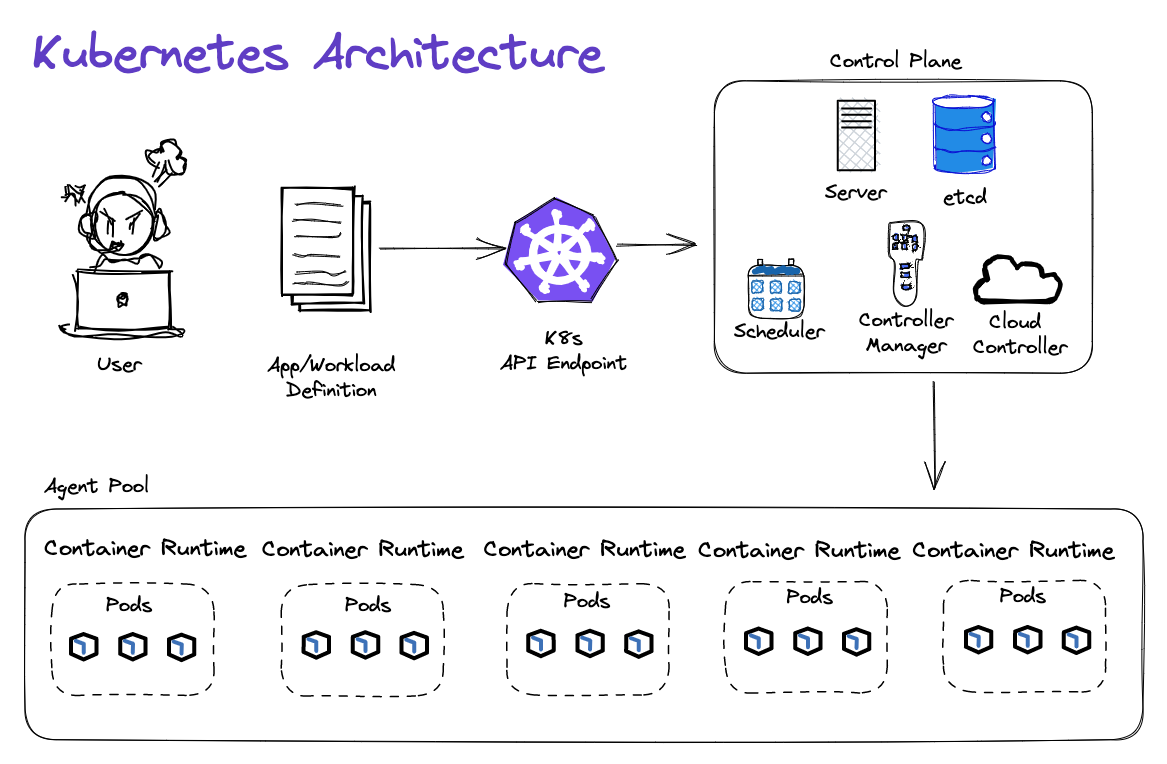
Kubernetes Architecture
Amazon Elastic Kubernetes Service (Amazon EKS) is a managed Kubernetes service to run Kubernetes in the AWS cloud and on-premises data centers. In the cloud, Amazon EKS automatically manages the availability and scalability of the Kubernetes control plane nodes responsible for scheduling containers, managing application availability, storing cluster data, and other key tasks. With Amazon EKS, you can take advantage of all the performance, scale, reliability, and availability of AWS infrastructure, as well as integrations with AWS networking and security services. On-premises, EKS provides a consistent, fully-supported Kubernetes solution with integrated tooling and simple deployment to AWS Outposts, virtual machines, or bare metal servers.
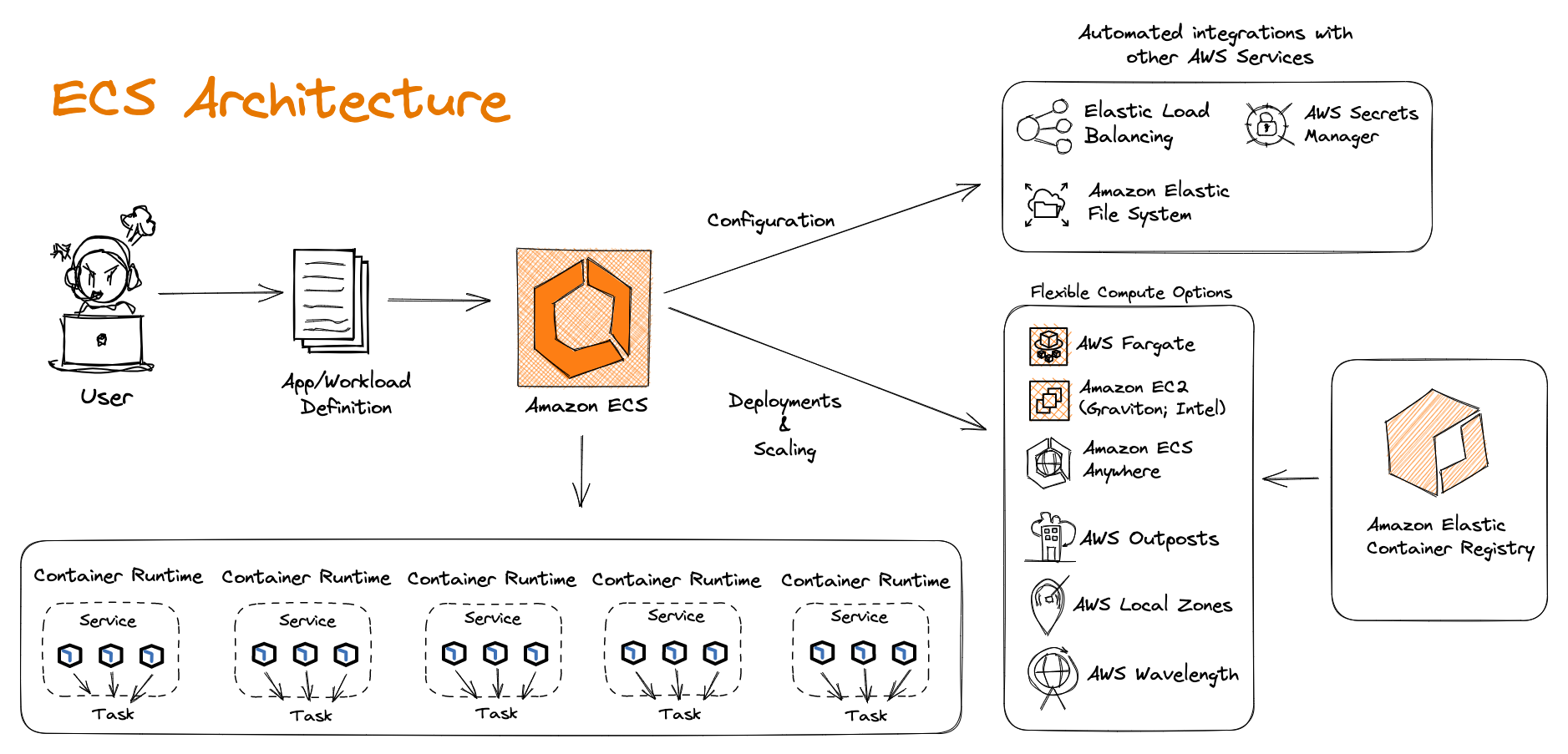
Amazon ECS Architecture
Amazon Elastic Container Service (Amazon ECS) is a fully managed container orchestration service that simplifies your deployment, management, and scaling of containerized applications. Simply describe your application and the resources required, and Amazon ECS will launch, monitor, and scale your application across flexible compute options with automatic integrations to other supporting AWS services that your application needs. Perform system operations such as creating custom scaling and capacity rules, and observe and query data from application logs and telemetry.
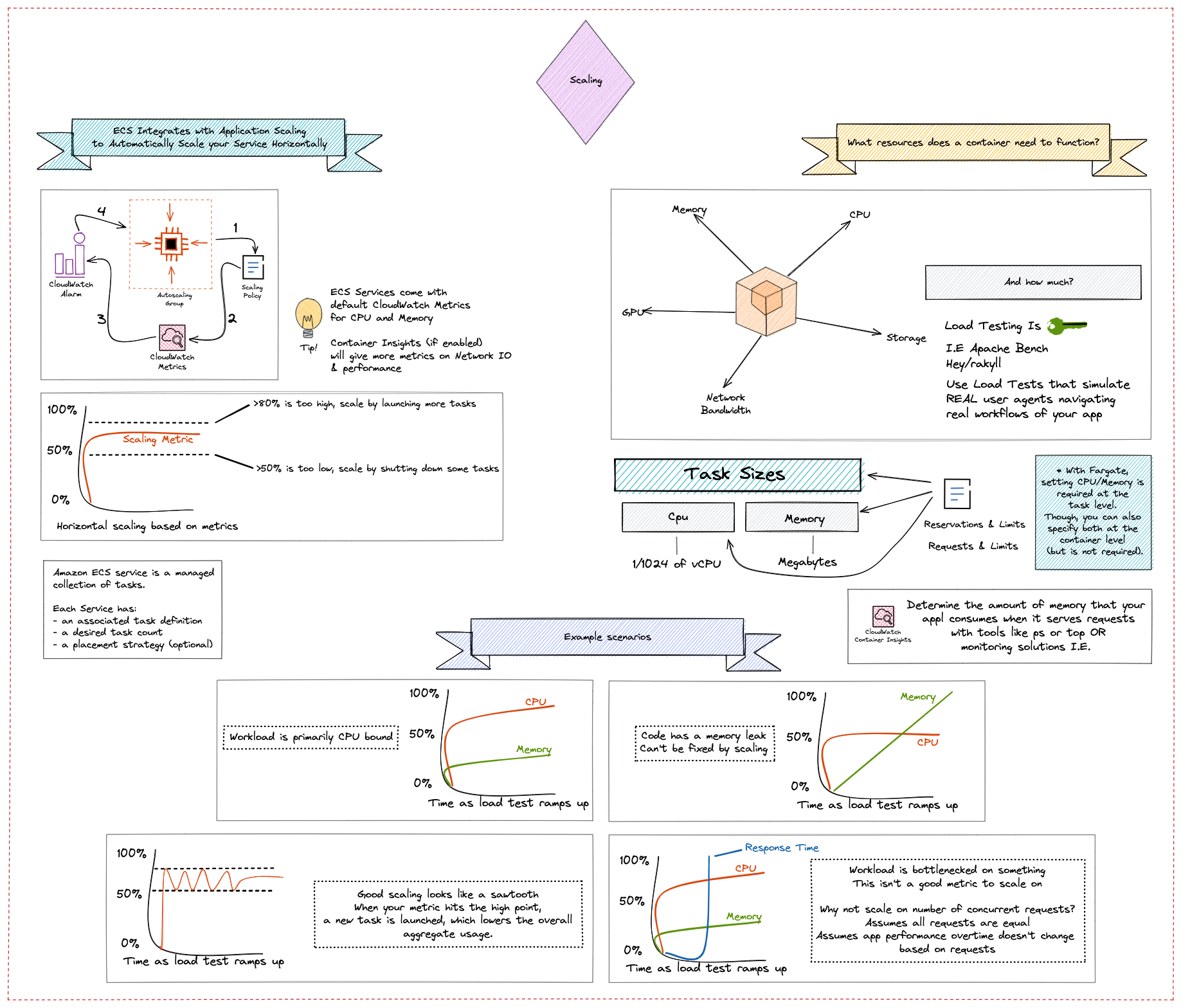
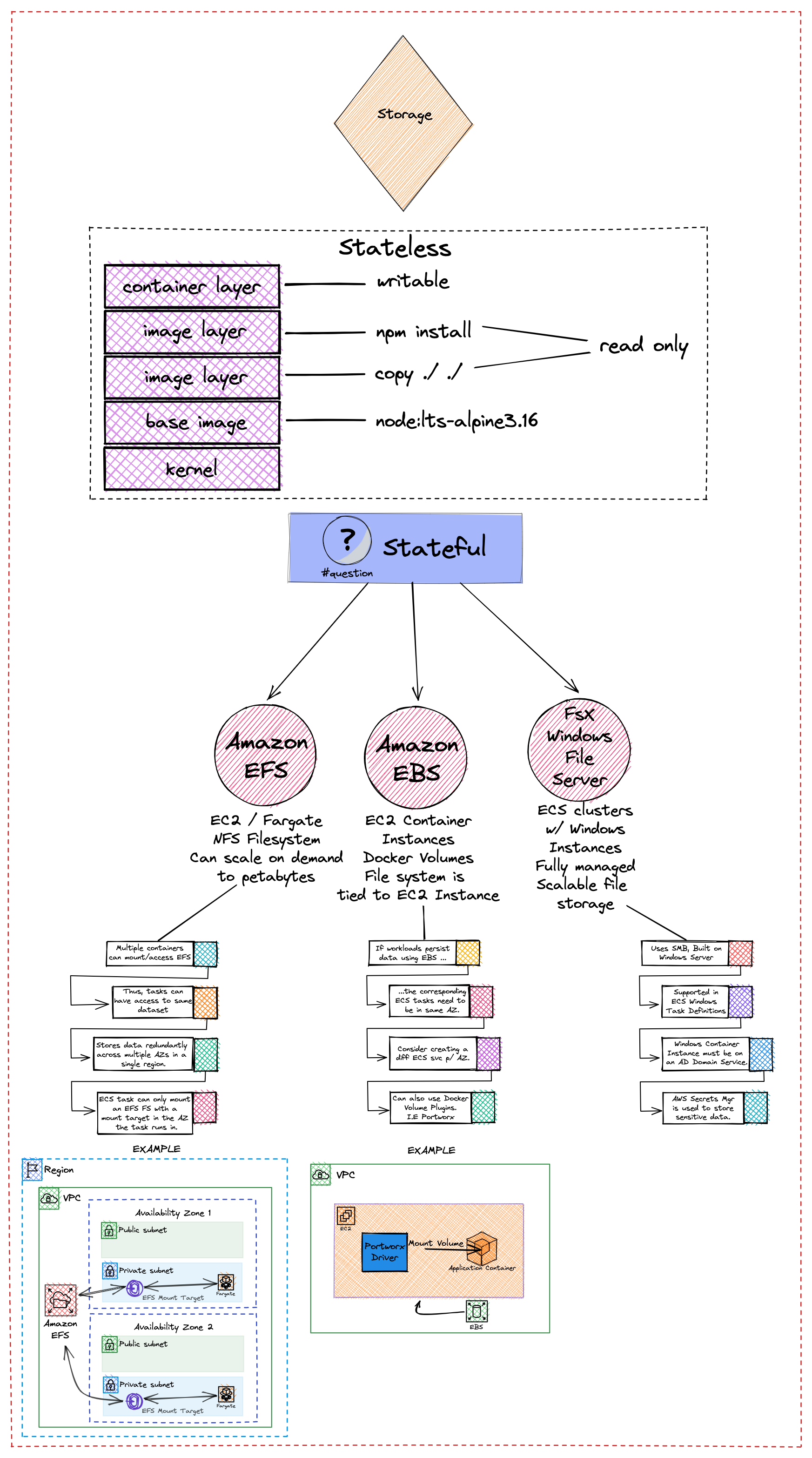
Container Platform Best Practices: Storage
You can use Amazon ECS to run stateful containerized applications at scale by using AWS storage services, such as Amazon EFS, Amazon EBS, or FSx for Windows File Server, that provide data persistence to inherently ephemeral containers. The term data persistence means that the data itself outlasts the process that created it. Data persistence in AWS is achieved by decoupling compute and storage services. Similar to Amazon EC2, you can also use Amazon ECS to decouple the lifecycle of your containerized applications from the data they consume and produce. Using AWS storage services, Amazon ECS tasks can persist data even after tasks terminate.
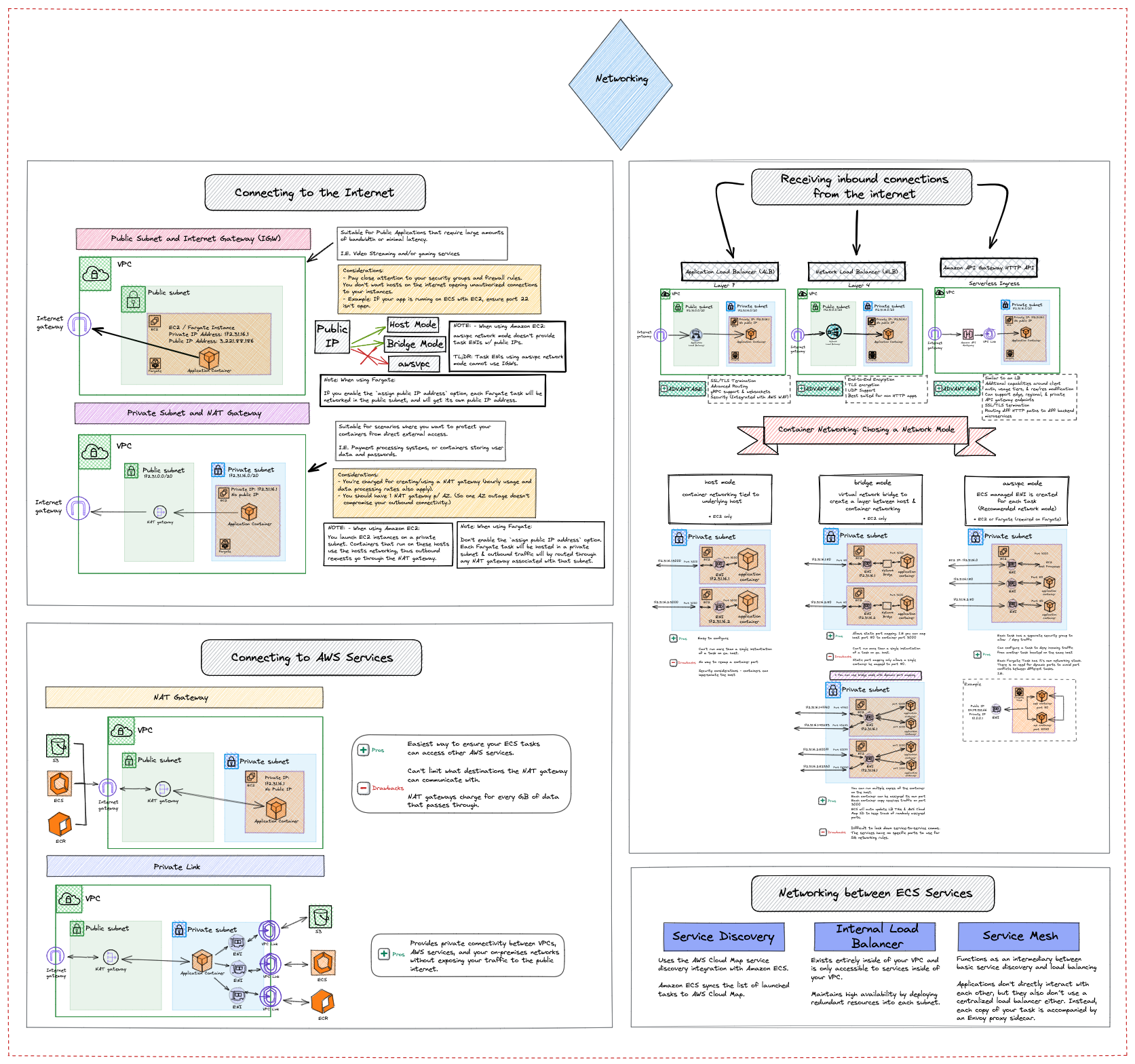
Container Platform Best Practices: Security
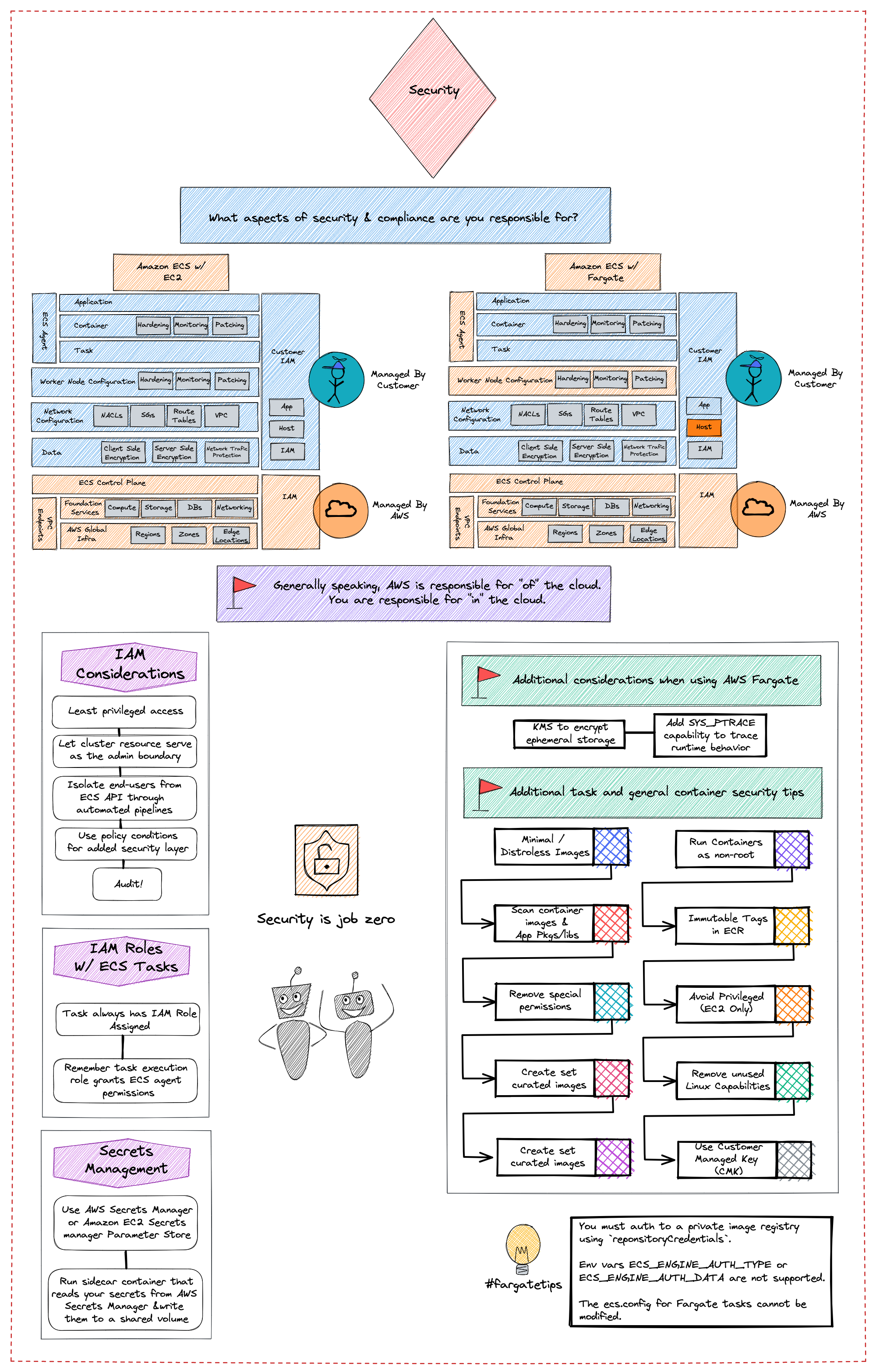
This visual provides security and compliance recommendations for protecting your information, systems, and other assets that are reliant on Amazon ECS. It also introduces some risk assessments and mitigation strategies that you can use to have a better grip on the security controls that are built for Amazon ECS clusters and the workloads that they support. Each topic in this guide starts with a brief overview, followed by a list of recommendations and best practices that you can use to secure your Amazon ECS clusters.
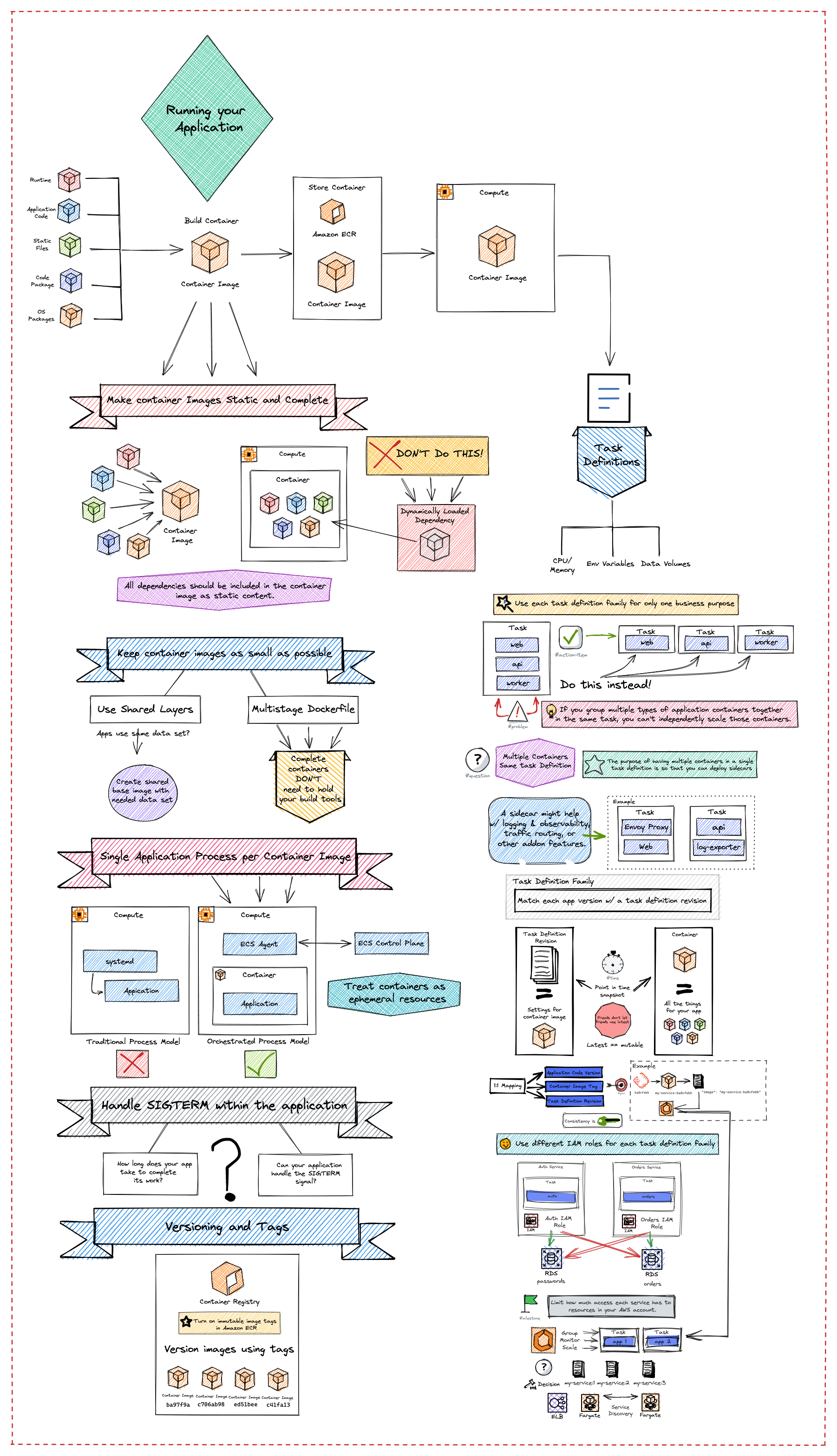
Container Platform Best Practices: Running Your App
Before you run an application using Amazon Elastic Container Service, make sure that you understand how the various aspects of your application work with features in Amazon ECS. This visual covers the main Amazon ECS resources types, what they’re used for, and best practices for using each of these resource types.